When business owners compare Keap vs Pipedrive, it usually comes down to one big question: which CRM will actually make sales and marketing easier? A good CRM (Customer Relationship Management) system isn’t just a contact list—it helps you manage leads, track deals, and stay connected with customers. Choosing the right one can improve sales performance, save hours of manual work, and keep your team focused on growth. Pick the wrong one, and you risk wasting time, losing leads, and frustrating staff.
Keap (formerly Infusionsoft) and Pipedrive are two of the most popular CRM platforms for small businesses, but they’re built with very different goals in mind. Keap combines CRM features with advanced marketing automation, while Pipedrive focuses on keeping your sales pipeline simple, visual, and easy to manage.
In this article, we’ll walk through a detailed Keap vs Pipedrive comparison. You’ll see what each platform does best, where they fall short, and which one is the smarter choice for your specific business needs. Whether you’re here for a full Keap CRM review, a Pipedrive CRM comparison, or just guidance on the best CRM for small businesses, you’ll find everything you need to make your choice.
Quick Overview: Keap vs Pipedrive at a Glance
If you’re short on time and just want the highlights, here’s a side-by-side look at Keap vs Pipedrive:
| Feature | Keap | Pipedrive |
| Target Audience | Small businesses, solopreneurs, and service providers who need sales + marketing tools in one platform | Sales teams, startups, and businesses that want a simple, visual CRM |
| Core Focus | CRM + marketing automation (email, SMS, payments, scheduling) | Sales pipeline management, lead tracking, deal flow |
| Ease of Use | More powerful, but has a steeper learning curve | Very intuitive and user-friendly, minimal setup required |
| Pricing | Starts higher (around $159/month), includes automation and payments | Starts lower (around $14.90/month), with extra cost for add-ons and advanced features |
| Best For | Businesses that want an all-in-one CRM + automation without needing multiple tools | Businesses that need a straightforward sales CRM without heavy marketing features |
What is Keap?

Keap, formerly known as Infusionsoft, is a CRM designed specifically with small businesses in mind. Over the years, it has grown into more than just a contact management tool – it’s an all-in-one platform that combines CRM + marketing automation, making it popular with business owners who want to manage sales and marketing in the same place.
Key Keap CRM Features
- CRM + Marketing Automation in One: Store and organize customer data, while automating repetitive marketing tasks like follow-up emails or reminders.
- Advanced Email Campaigns and Workflows: Build complex nurture sequences with triggers, tags, and conditional logic to engage leads over time.
- Appointment Scheduling: Share booking links with clients and sync calendars automatically.
- Invoicing and Payments: Send invoices, accept payments, and even set up recurring billing – all without leaving the platform.
Keap Pros for Small Business Owners
- Combines CRM, marketing, and payments into one tool (fewer subscriptions to manage).
- Strong automation features that save time and reduce manual follow-ups.
- Ideal for service-based businesses that need client scheduling and invoicing built in.
Keap Cons for Small Business Owners
- Pricing starts higher than many other CRMs, which may be a hurdle for new or very small businesses.
- More complex setup and learning curve compared to simpler tools like Pipedrive.
- Feels overwhelming if you only need basic sales tracking.
What is Pipedrive?

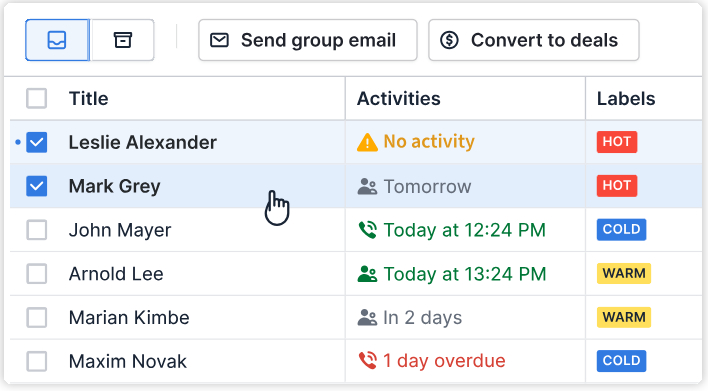
Pipedrive is a sales-focused CRM built to keep things simple, visual, and effective. Unlike platforms that try to do everything, Pipedrive was designed from the ground up to help sales teams stay organized, track deals, and close more business without unnecessary complexity. For many companies, it’s one of the easiest CRMs to set up and start using right away.
Need a good accounting software? Check out this comparison – QuickBooks vs Quicken – Which is Right for You?
Key Pipedrive Features
- Visual Sales Pipeline: Drag-and-drop deal stages that give you a clear picture of where every opportunity stands.
- Lead and Deal Tracking: Manage contacts, track progress, and set reminders so no lead slips through the cracks.
- Customizable Dashboards and Reporting: Build dashboards tailored to your KPIs and get reports that make performance easy to understand.
- Marketplace Integrations: Connect with popular apps like Zapier, Slack, Zoom, QuickBooks, and more for smoother workflows.
Pipedrive Pros for Sales Teams
- Extremely easy to use with a clean, intuitive interface.
- Affordable starting price compared to many other CRMs.
- Great for sales teams who want to focus on pipeline management without distractions.
- A large integration marketplace makes it flexible.
Pipedrive Cons for Sales Teams
- Limited marketing automation compared to competitors like Keap.
- Some advanced features (like email automation or forecasting) require add-ons or higher-tier plans.
- Not the best fit for businesses needing invoicing, scheduling, or built-in marketing tools.
Feature-by-Feature Comparison: Keap vs Pipedrive

To really understand the difference between these two CRMs, let’s compare them side by side across the features that matter most.
CRM & Contact Management
- Keap: Offers advanced contact management with built-in segmentation, tagging, and automation triggers. You can easily group leads, set up rules for follow-ups, and track customer activity.
- Pipedrive: Keeps things simple with clean deal tracking and activity reminders. It’s great for organizing sales tasks, but doesn’t go as deep into automation or segmentation.
Sales Pipeline Management
- Keap: While its pipelines are decent, they’re secondary to its marketing automation tools. It’s helpful if you need a basic sales process but not as advanced for pipeline customization.
- Pipedrive: This is where it shines. Pipedrive offers strong visual pipelines that you can customize for your sales process. Drag-and-drop functionality makes it easy to move deals along.
Marketing Automation
- Keap: A clear winner in this area. You can set up advanced email campaigns, SMS follow-ups, and nurture sequences tailored to each lead’s behavior.
- Pipedrive: Limited. Marketing automation isn’t built in—you’ll need to rely on third-party integrations (like Mailchimp or ActiveCampaign) for anything beyond basic email tracking.
Integrations & Ecosystem
- Keap: Includes native tools for e-commerce, invoicing, payments, and appointment scheduling. This makes it a strong all-in-one option for service-based businesses.
- Pipedrive: Has a wide integration marketplace with hundreds of apps (Zapier, Slack, QuickBooks, Zoom, and more). It doesn’t try to do everything natively but plays well with other tools.
Ease of Use & Learning Curve
- Keap: More powerful, but comes with a steeper learning curve. Setting up workflows and automation requires time and training.
- Pipedrive: Extremely simple and intuitive. Most users can get started in a day without much onboarding.
Which Businesses Should Choose Keap?
Best For:
- Small businesses that want CRM + built-in marketing automation in a single platform.
- Coaches, consultants, and service providers who need features like appointment scheduling, invoicing, and payments.
- Businesses that rely on nurturing leads over time through email campaigns, reminders, and follow-ups.
Pain Points Keap Solves:
- Spending too much money on separate software for CRM, email marketing, and invoicing.
- Leads slipping through the cracks because follow-ups aren’t automated.
- Wasted time on repetitive tasks like sending reminders, appointment scheduling, or collecting payments.
Which Businesses Should Choose Pipedrive?
Best For:
- Sales-focused teams that need a visual, drag-and-drop pipeline to track deals.
- Startups and small businesses already using other marketing tools (like Mailchimp or HubSpot) and just need a CRM for sales.
- Companies that want a budget-friendly CRM without paying for features they won’t use.
Pain Points Pipedrive Solves:
- Overly complex CRMs that require weeks of training or setup.
- Lack of visibility into where deals stand in the sales process.
- Missed follow-ups because of poor task management or disorganized contact lists.
Alternatives to Keap and Pipedrive
1. HubSpot CRM
- Why consider it: HubSpot offers a free CRM with strong sales tools, plus optional marketing, customer service, and operations hubs as your business grows.
- Best for: Small to mid-sized businesses that want a scalable platform without committing to a high upfront cost.
2. Zoho CRM
- Why consider it: Zoho provides an affordable, feature-rich CRM with sales automation, analytics, and integrations into the larger Zoho ecosystem.
- Best for: Businesses looking for a budget-friendly alternative to Keap or Pipedrive, with flexibility to expand into other tools like accounting, help desk, or email.
3. Salesforce Essentials
- Why consider it: Salesforce is the global leader in CRM, and the Essentials plan makes its powerful tools accessible to small businesses.
- Best for: Teams that want enterprise-grade features on a smaller scale, with the ability to grow into the full Salesforce platform later.
FAQs: Keap vs Pipedrive
Is Keap better than Pipedrive?
It depends on what you need. Keap is better if you want CRM, marketing automation, and payments all in one platform. Pipedrive is better if your main goal is managing a sales pipeline in a simple, visual way.
Does Pipedrive have marketing automation?
Not natively. Pipedrive is sales-focused, so its automation mainly covers tasks like deal updates and reminders. For advanced email or SMS campaigns, you’ll need to connect it with tools like Mailchimp, ActiveCampaign, or Zapier.
Is Keap worth the higher price?
For many small businesses, yes—if you’ll actually use the built-in email marketing, automation, and payment tools. But if all you need is sales tracking, Pipedrive’s lower pricing may be more cost-effective.
Which CRM is easier to use, Keap or Pipedrive?
Pipedrive is much easier to use and can be set up in a day. Keap is more powerful but has a steeper learning curve, especially when setting up automation and workflows.
Can I migrate from Pipedrive to Keap (or vice versa)?
Yes. Both platforms allow you to export and import contacts, deals, and other data. You can do it manually using CSV files, or use third-party migration tools for a smoother transfer.

Comments are closed.
Comments: 2
Pingbacks and Tracebacks
[…] Related Keap vs Pipedrive: Which CRM Is Right for Your Business in 2025? […]
[…] Read Also: Keap vs Pipedrive: Which CRM Is Right for Your Business in 2025? […]