
The best eDiscovery software for small businesses will help SMEs find, organize, and manage digital data needed for legal purposes. Imagine having to dig through thousands of emails, documents, and files to find something specific, it’s time-consuming and stressful. eDiscovery tools make this process faster and easier by letting you search, sort, and review data in one place.
After testing several options, we found that Logikcull is hands-down the best eDiscovery software for small businesses. It’s affordable, incredibly easy to use, and doesn’t require a tech expert to get started.
If you’re running a small business, you need software that works as hard as you do without breaking the bank, and Logikcull fits the bill perfectly. In this post, we’ll explore more great tools like it and help you choose the best eDiscovery software for your small business needs.
What to Look for in eDiscovery Software for Small Businesses
Ease of Use and Intuitive Interface
Small businesses often don’t have the luxury of dedicated IT teams, so the software should be user-friendly. Look for an intuitive interface that doesn’t require extensive training to navigate or understand.
Compatibility with Various File Formats
Your data could be in emails, PDFs, spreadsheets, or other formats. The best eDiscovery software for small businesses should be able to handle all of these file types seamlessly.
Data Security and Compliance Support
Protecting sensitive business information is non-negotiable. Choose a tool that prioritizes data security with encryption and compliance features to help you meet legal and regulatory standards like GDPR or HIPAA, if applicable.
Advanced Search and Analytics Capabilities
Effective eDiscovery tools allow you to quickly locate specific information using advanced search filters, keywords, and analytics. This feature can save you countless hours when deadlines are tight.
Budget-Friendly Pricing
Small businesses often operate on tight budgets, so affordability matters. Look for tools that offer transparent pricing with no hidden fees and plans tailored to small teams.
Scalability for Growing Needs
As your business grows, your eDiscovery needs might expand too. Make sure the software you choose can scale up to handle increased data volume or additional users without requiring a complete overhaul.
Customer Support and Training Resources
Reliable customer support is essential, especially when you’re new to eDiscovery tools. Look for providers that offer live support, detailed documentation, and training resources to help you get started quickly and resolve any issues along the way.
Read Also: Best HR Software for Startups in 2025.
The 17 Best eDiscovery Software for Small Businesses
1. Logikcull
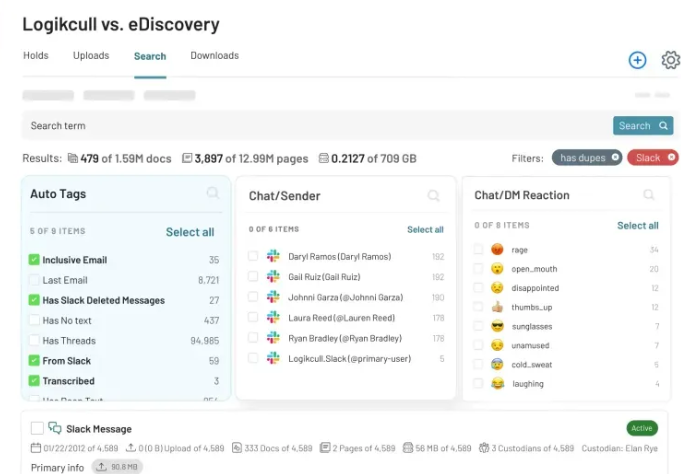
Logikcull is a user-friendly, cloud-based eDiscovery platform tailored for small businesses. It simplifies the process of finding and managing data, even if you’re new to legal tech. Pricing Starts at $395/month (per matter). It features the following;
- Drag-and-drop uploads for easy file importing.
- Automatic data organization.
- Powerful search filters and keyword tools.
- Bank-level security to protect sensitive data.
Pros:
- Extremely intuitive interface.
- No additional IT support is needed.
Cons:
- Pricing may be high for very small cases.
2. Nextpoint
Designed specifically for small to medium-sized teams, Nextpoint is a cloud-based solution that makes eDiscovery straightforward and efficient. It has the following features;
- Streamlined case preparation tools.
- Unlimited storage for documents.
- Real-time collaboration with team members.
Pros:
- Affordable for small businesses.
- Comprehensive tools for trial preparation.
Cons:
- Advanced features may have a learning curve.
Read Also: 19 Best Accounting Software for Cleaning Business.
3. Everlaw
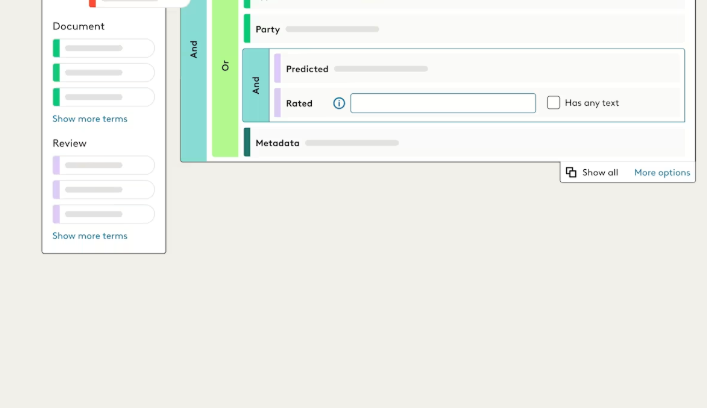
Everlaw combines eDiscovery with collaboration tools, making it ideal for legal teams working together on cases. Key Features include;
- Visual search tools and timelines.
- AI-driven document review.
- Secure cloud storage and sharing.
Pros:
- Great for teams that need to collaborate remotely.
- Advanced analytics for in-depth case insights
Cons:
- Might be overpowered for solo users or very small teams.
4. RelativityOne
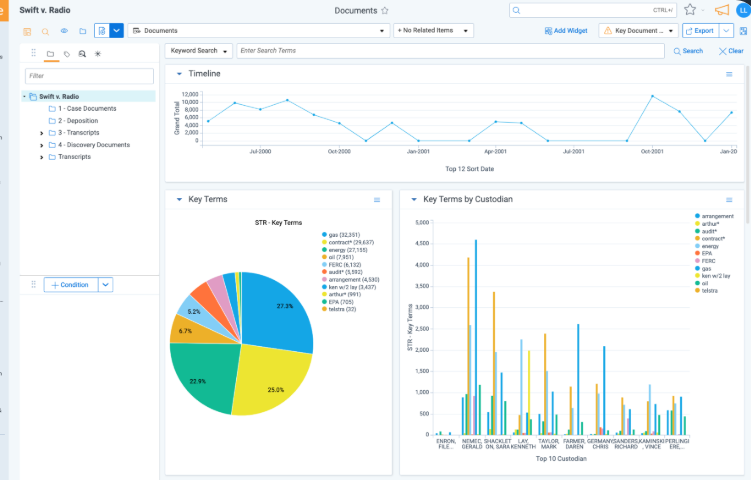
RelativityOne is a cloud-based eDiscovery platform known for its scalability, making it a reliable choice for growing small businesses. Key Features are:
- Advanced AI and machine learning for document review.
- Scalable storage and processing power.
- Integration with third-party tools.
Pros:
- Handles complex cases with ease.
- Scales well with growing businesses.
Cons:
- Higher cost compared to other options.
Read Also: 23 Best Backup Software for 2025 (Personal, Business, Free & Cloud)
5. CloudNine
CloudNine is an affordable eDiscovery solution that delivers efficiency without compromising on essential features like;
- Automated data imports and processing.
- Advanced search and tagging features.
- Flexible deployment options (cloud or on-premise).
Pros:
- Budget-friendly for small businesses.
- Easy setup and minimal training required.
Cons:
- Limited advanced features compared to higher-end tools.
6. Onna
Onna stands out as a modern eDiscovery tool that integrates seamlessly with the platforms small businesses already use, like Slack, Google Workspace, and Microsoft Teams. Key Features are:
- Centralized data collection from multiple platforms.
- Advanced search and filtering capabilities.
- Automated compliance archiving.
Pros:
- Saves time by pulling data directly from commonly used apps.
- Simple and intuitive interface.
Cons:
- Best suited for businesses heavily reliant on integrated platforms.
7. ZyLAB ONE
ZyLAB ONE leverages AI-powered features to streamline the eDiscovery process, making it faster and more efficient for small teams. Key Features include:
- AI tools for automatic document tagging and prioritization.
- Comprehensive search and filtering options.
- Built-in data visualization for better insights.
Pros:
- AI features significantly reduce time spent on manual tasks.
- Scales well for growing businesses.
Cons:
- Requires a bit of training to maximize its full potential.
8. DISCO
DISCO is one of the best ediscovery software for small businesses with beautiful UI and powerful features, making it a favorite among small businesses and law firms alike. Features are:
- Cloud-based platform for easy access and collaboration.
- Advanced search and review tools.
- Automatic tracking of review progress.
Pros:
- Easy to use with minimal training required.
- Offers excellent support for small teams.
Cons:
- Pricing can add up for larger cases.
9. IPRO
IPRO offers a comprehensive eDiscovery solution that’s great for small businesses looking for an all-in-one platform. Features include:
- End-to-end eDiscovery workflow support.
- Robust data processing and review capabilities.
- Customizable dashboards and reporting.
Pros:
- Full-suite solution with everything you need in one place.
- Excellent for managing complex or multi-case scenarios.
Cons:
- May feel overwhelming for very small teams or one-off cases.
10. Casepoint
Casepoint combines advanced technology with user-friendly tools, offering predictive coding and analytics to speed up eDiscovery tasks. Features of this software are:
- Predictive coding to prioritize relevant documents.
- Integrated tools for case management.
- Flexible deployment options (cloud or on-premise).
Pros:
- Great for small businesses needing powerful analytics.
- Helps reduce review time with AI assistance.
Cons:
- Advanced features may be more than small teams need.
11. Exterro
Exterro is well-known for its strong emphasis on data privacy and governance, making it an excellent choice for small businesses in regulated industries. Key Features are:
- Compliance management for regulations like GDPR.
- Automated workflows for legal holds and data preservation.
- Comprehensive reporting and auditing tools.
Pros:
- Exceptional for businesses with strict compliance needs.
- Scalable for growing businesses.
Cons:
- Require initial setup and training to use effectively.
12. Proofpoint
Proofpoint is a specialized eDiscovery tool focused on email archiving and compliance, making it a great choice for businesses that need to manage large volumes of email data securely. Key Features:
- Enterprise-grade email archiving.
- Compliance tools for regulatory requirements like GDPR and HIPAA.
- Advanced search and retrieval functions for quick access to emails.
Pros:
- Excellent for email-heavy industries.
- Strong focus on compliance and security.
Cons:
- Limited functionality outside of email data management.
13. Legal Hold Pro
Legal Hold Pro by Zapproved is a simple yet powerful tool designed to streamline legal hold processes for small businesses. Key Features:
- Automated legal hold notifications and tracking.
- Intuitive dashboard for managing active holds.
- Comprehensive audit trails for compliance.
Pros:
- Makes the legal hold process fast and hassle-free.
- Clear and detailed reporting features
Cons:
- Focused only on legal holds; lacks broader eDiscovery functionality.
14. GoldFynch
GoldFynch is a budget-friendly eDiscovery platform tailored for small teams, offering essential features without unnecessary complexity. Key Features:
- Cloud-based with easy file uploads.
- Pay-as-you-go pricing model based on data size.
- Automatic file conversion for common formats like PDFs.
Pros:
- Extremely cost-effective for small businesses.
- Straightforward and easy to use.
Cons:
- Lacks advanced features for complex cases.
15. Altium Discovery
Altium Discovery offers a streamlined eDiscovery experience, focusing on flexibility and ease of use, making it ideal for small businesses. Key Features include:
- Fast data processing and search capabilities.
- Customizable workflows to suit business needs.
- Detailed reporting tools for better insights.
Pros:
- Flexible pricing options for small teams.
- Efficient and easy-to-learn platform.
Cons:
- Limited integrations compared to other tools.
16. Milyli Blackout
Milyli Blackout focuses on data redaction and security, helping small businesses protect sensitive information during the eDiscovery process. Some Features are:
- Automated redaction tools for secure data handling.
- Compatible with multiple file types.
- Integration with Relativity for enhanced workflows.
Pros:
- Reduces the risk of exposing confidential information.
- Simple, automated redaction saves time.
Cons:
- Primarily a redaction tool; lacks broader eDiscovery features.
17. eZReview
eZReview is a complete end-to-end eDiscovery solution designed for ease of use, making it a solid option for small businesses. Key Features include the following:
- Automated data collection and processing.
- Powerful search and analytics tools.
- User-friendly interface with customizable workflows.
Pros:
- All-in-one solution for eDiscovery needs.
- Simple to navigate, even for first-time users.
Cons:
- Pricing may be higher than simpler tools.
How to Choose the Right eDiscovery Software for Your Small Business
1. Understand what you Need
Before diving into the options, take time to understand your business’s specific legal and compliance requirements.
- Do you need the software for managing legal holds, email archiving, or processing large amounts of data?
- Are there particular regulations, like GDPR or HIPAA, that your business must adhere to?
2. Set a Budget
Small businesses need to balance costs carefully, so consider your budget and evaluate how cost-effective each option is relative to the features it offers.
- Avoid paying for features you won’t use, especially if your business handles smaller, simpler cases.
- Look for software with transparent pricing and flexible plans, such as pay-as-you-go models.
3. Check out Demo and Trial Options
Most eDiscovery platforms offer free trials or demos, that help you test the software’s capabilities before committing.
- Use this opportunity to check how easy it is to navigate the interface and perform basic tasks.
- Involve your team during trials to ensure the tool works well for everyone who will be using it.
- Pay attention to customer support during this phase; responsive support can save you headaches later.
4. Check for Scalability and Integration
Your business might grow, and your software should grow with it. Choose an eDiscovery tool that can handle increasing data volume and additional users.
- Ensure the software integrates with the tools you already use, like Slack, Microsoft Teams, or Google Workspace.
- Ask whether the platform offers upgrades or additional features that can be added as your needs evolve.

Comments are closed.
One comment
Pingbacks and Tracebacks
[…] Read Also: 17 Best Ediscovery Software for Small Businesses […]